- Key Takeaways
- Who Needs Purchase Management Software?
- What Problem Does Purchase Management Software Solve?
- What Is Purchase Management Software?
- 7 Signs Your Purchase Process Has Outgrown Excel
- Purchase Management Workflow for Manufacturing
- What Should Purchase Management Software Automate?
- What Should a Manufacturer Look For in Purchase Software?
- Purchase Management Software vs Excel: What Actually Changes?
- Purchase Management Software vs Tally: How Should They Work Together?
- How Much Does Purchase Management Software Cost in India?
- Purchase Management Software Buyer Checklist (25 Points)
- What to Ask During a Purchase Management Software Demo
- What We Commonly See During ERP Purchase-Process Implementation
- How Shivaizer’s Documented Workflow Supports Purchase Management
- What Should You Do Next?
- Frequently Asked Questions
- Conclusion
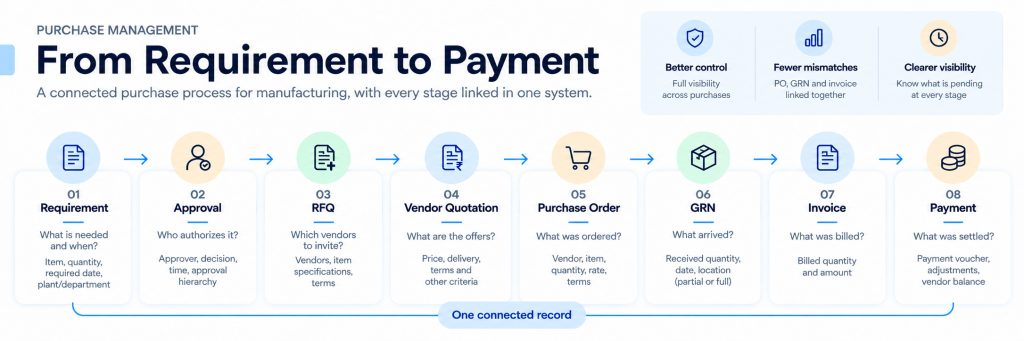
Purchase management software . connects the whole purchasing lifecycle: requirement, approval, RFQ, vendor quotation, comparison, purchase order, goods receipt (GRN), invoice and payment. For Indian manufacturers, the value is not faster PO creation. It is controlling what was requested, who approved it, which vendor was chosen, what was received and what was billed, in one connected record.
Purchase management software is a system that manages purchasing from requirement and approval through supplier quotation, purchase order, goods receipt and invoice processing, while keeping these records connected for tracking and control.
For manufacturers, the key value is connecting purchasing with receiving, inventory and financial verification, not simply creating purchase orders.
Key Takeaways
- 1 Judge software by whether each stage feeds the next, not by the length of its feature list.
- 2 Excel can handle calculations, but it becomes difficult to maintain purchasing control when requests, approvals, quotations, receipts and invoices are spread across multiple files and people.
- 3 Manufacturers need partial receipts, GRN, inventory impact and multi-location purchasing. Software built mainly for buying finished goods for resale may handle these weakly.
- 4 Total cost of ownership includes implementation, migration, training, integration, customization and support, not just the subscription.
- 5 Test any product with your own scenario, from raw material requirement to invoice mismatch, before you buy.
Who Needs Purchase Management Software?
Manufacturers whose purchasing has grown beyond what one person or one spreadsheet can track: more vendors, more approvers, more warehouses or plants, and more open POs.
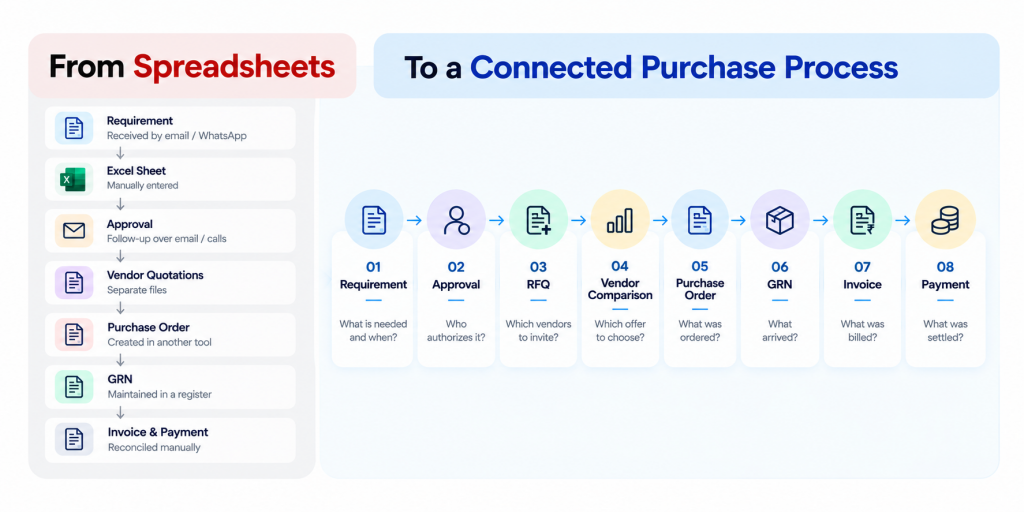
The pattern is familiar. Requests arrive by email or WhatsApp. Approvals need follow-up calls. Quotations sit in separate files. Nobody can say quickly which POs are open or partly received. Finance then spends days checking whether invoices match what was ordered and received.
What Problem Does Purchase Management Software Solve?
It removes the gaps between purchasing stages, so each stage creates the record the next stage uses.
In most manufacturing units, every stage already exists but lives in a different place: the requisition on a form, the approval in a chat, the quotations in Excel, the PO in accounting software, the receipt in a stores register. Every handover means re-entry, delay and a chance of mismatch.
What Is Purchase Management Software?
It is a system that organizes and automates purchasing from requirement to vendor settlement. Depending on the product, it covers purchase requisitions, approvals, RFQs, quotation comparison, purchase orders, GRN, invoice processing, vendor management and reports.
You will also see it called procurement management software, procurement software, purchase order management or purchase process automation. The labels overlap, so compare workflow depth rather than the name. Some products cover only PO creation. Others cover the full cycle described in this guide. The PO should not be an isolated document: it should anchor receiving, quantity tracking, vendor history and financial verification.
7 Signs Your Purchase Process Has Outgrown Excel
If several of these problems exist together, your purchasing process may have outgrown spreadsheet-based coordination.
-
Approval status lives in someone’s memory. A purchase manager cannot say which requests are waiting, and with whom, without messaging people.
-
Requirements arrive through WhatsApp or email and are retyped. The same item gets entered two or three times, and spellings and units drift.
-
Quotation comparison is a fresh spreadsheet every time. Nobody can easily reuse or audit last quarter’s comparison.
-
You cannot filter open, partly received and closed POs in seconds. A vendor delivers part of a consignment and the balance is tracked in someone’s notebook.
-
Stores and accounts disagree. The GRN register shows one quantity, the invoice another, and reconciling takes days.
-
Vendor price history is a search exercise. “What did we pay for this item last time, and from whom?” takes a long time to answer.
-
Monthly purchase reports are assembled by hand. Different plants use different formats, and someone consolidates them each month.
Buyer implication: the issue is not Excel itself. It is that purchasing information is fragmented across files and people.
Purchase Management Workflow for Manufacturing
| Stage | What should be recorded | What it feeds |
|---|---|---|
| Requisition | Item, quantity, required date, requesting plant or department | Approval, RFQ |
| Approval | Approver, decision, time | RFQ or PO release |
| RFQ | Vendors invited, specifications | Quotations |
| Quotations | Price, delivery, terms per vendor | Comparison |
| Comparison | Selected vendor and basis of selection | PO |
| PO | Vendor, item, quantity, rate, terms | GRN, invoice check |
| GRN | Received quantity, date, location, partial or full | Inventory (where integrated), invoice check |
| Invoice | Billed quantity and amount | Verification, payment |
Item, quantity, required date, requesting plant or department
What it feedsApproval, RFQ
Approver, decision, time
What it feedsRFQ or PO release
Vendors invited, specifications
What it feedsQuotations
Price, delivery, terms per vendor
What it feedsComparison
Selected vendor and basis of selection
What it feedsPO
Vendor, item, quantity, rate, terms
What it feedsGRN, invoice check
Received quantity, date, location, partial or full
What it feedsInventory (where integrated), invoice check
Billed quantity and amount
What it feedsVerification, payment
What Should a Manufacturer Look For in Purchase Software?
Manufacturers need software that handles raw materials against production needs, receipts across sites, partial deliveries and inventory impact. Software that stops at the PO usually leaves these gaps.
-
Raw materials and production requirements. You should be able to trace why something was bought (the requirement), not just what was bought.
-
Multiple plants and warehouses. Purchasing may be centralized while receiving happens at several sites. Check whether requisitions, POs and GRNs can be tied to specific locations.
-
Vendor comparison. Manufacturing purchases often depend on specification, lead time and delivery reliability as well as rate. The comparison should hold these.
-
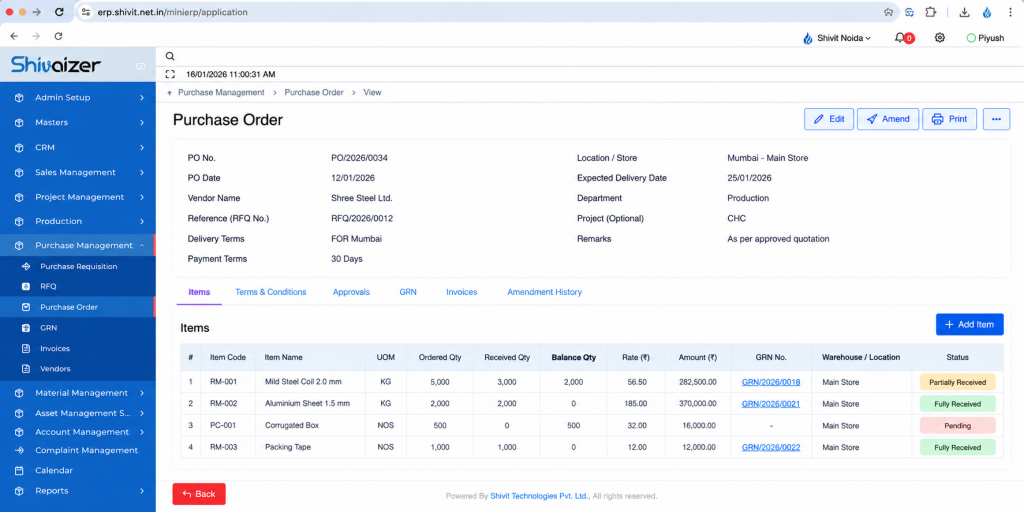
Partial receipts. Vendors often deliver in lots. The PO must show the balance quantity and stay open until fulfilled.
-
GRN and inventory impact. Where inventory is integrated, purchase, GRN, stock and item-ledger figures should stay consistent.
-
Invoice verification. Billed quantity and rate should be checked against the PO and what was actually received.
-
Vendor history. Past prices, deliveries and receipts should be retrievable.
-
Approval control. Higher-value or non-standard purchases should follow defined approval paths.
a production planner needs 5 tonnes of a raw material. In a disconnected process, the requirement, approval, three quotations and the eventual partial delivery of 3 tonnes live in four places. In a connected workflow, one requirement traces to one approval, one comparison, one PO and two GRNs, with a visible 2-tonne balance.
Purchase Management Software vs Excel: What Actually Changes?
| Area | Excel and email | Purchase management software |
|---|---|---|
| Approval | Email or verbal; hard to audit | Routed and recorded in the system |
| Quotation comparison | Separate sheet per purchase | Structured comparison linked to the RFQ |
| PO status | Manual updates | Open, partial and closed status driven by receipts |
| GRN and invoice | Separate registers | Linked to the PO |
| Vendor history | Search across files | Retrievable from vendor records |
| Reporting | Manual consolidation | Generated from transaction data |
Email or verbal; hard to audit
Routed and recorded in the system
Separate sheet per purchase
Structured comparison linked to the RFQ
Manual updates
Open, partial and closed status driven by receipts
Separate registers
Linked to the PO
Search across files
Retrievable from vendor records
Manual consolidation
Generated from transaction data
Excel remains reasonable for low-volume, low-approval purchasing. A dedicated system pays off when the number of people, vendors and locations touching a purchase makes manual coordination the main cost.
Purchase Management Software vs Tally: How Should They Work Together?
Ask any vendor exactly what flows to Tally (vendors, bills, vouchers?), in which direction, and how mismatches are handled. Also confirm how the workflow supports GST-related bill records. For ITC and invoice-matching rules, refer to the official GST portal and CBIC notifications, and have your CA confirm the treatment.
How Much Does Purchase Management Software Cost in India?
Pricing varies widely with the product, number of users, modules, deployment model, implementation effort, customization and integrations. Any single figure quoted without those factors is not a reliable benchmark, so ask for a written quote against your scope.
Compare total cost of ownership, not the subscription line:
| Cost component | What to ask |
|---|---|
| Software | Per-user or per-module pricing? What do additional users, locations and modules cost? |
| Implementation | Who maps your process? Is it fixed-fee or effort-based? |
| Data migration | Who cleans and loads item masters, vendor masters and open POs? |
| Training | Which roles, how many sessions, and is a refresher included? |
| Integration | Tally or other ERP: standard or custom? Who maintains it? |
| Customization | Which of your requirements need custom work, and who supports it after upgrades? |
| Support | What are the response terms, and is support included or extra? |
Purchase Management Software Buyer Checklist (25 Points)
Score each point Yes / Partly / No during evaluation, and test the ones that matter most in a live demo rather than from a brochure.
| # | Checkpoint | Yes / Partly / No |
|---|---|---|
| Requisition and approval | ||
| 1 | Users can raise purchase requisitions in a structured format. | Yes / Partly / No |
| 2 | Requisitions can be tied to a plant, department or location. | Yes / Partly / No |
| 3 | Approval routing can vary by value, item category or location. | Yes / Partly / No |
| 4 | Approvers can act on requests without navigating a complex screen. | Yes / Partly / No |
| 5 | Approval history is stored and cannot be silently edited. | Yes / Partly / No |
| RFQ and quotations | ||
| 6 | RFQs can be created from an approved requisition. | Yes / Partly / No |
| 7 | Multiple vendors can be invited on one RFQ. | Yes / Partly / No |
| 8 | Vendors can submit quotations without your team re-entering them. | Yes / Partly / No |
| 9 | Quotations can be compared side by side on price, delivery and terms. | Yes / Partly / No |
| 10 | POs can be generated from the selected comparison. | Yes / Partly / No |
| PO and tracking | ||
| 11 | POs show open, partly received and closed status. | Yes / Partly / No |
| 12 | Balance quantity is visible after a partial delivery. | Yes / Partly / No |
| 13 | PO amendments are controlled and recorded. | Yes / Partly / No |
| Receipt and invoice | ||
| 14 | Partial receipts can be recorded against a PO. | Yes / Partly / No |
| 15 | The GRN is linked to the PO, not created independently. | Yes / Partly / No |
| 16 | Where inventory is in scope, the GRN updates the relevant stock records. | Yes / Partly / No |
| 17 | Vendor invoices can be checked against the PO and GRN. | Yes / Partly / No |
| 18 | Quantity or rate mismatches are flagged for review. | Yes / Partly / No |
| Vendor, control and audit | ||
| 19 | Vendor master holds contact, tax and terms information, with duplicate control. | Yes / Partly / No |
| 20 | Vendor purchase and price history is retrievable. | Yes / Partly / No |
| 21 | An audit trail records who did what, and when. | Yes / Partly / No |
| 22 | Role-based access limits who can create, approve or edit. | Yes / Partly / No |
| Reporting, locations and integration | ||
| 23 | Reports cover purchases, pending POs, GRN and stock. | Yes / Partly / No |
| 24 | Multiple locations are supported with location-wise visibility. | Yes / Partly / No |
| 25 | Integration with your accounting or ERP system (for example Tally) is documented, and its direction and scope are clear. | Yes / Partly / No |
What to Ask During a Purchase Management Software Demo
Ask the vendor to run your scenario, not their standard presentation. Share the scenario in advance.
- Raise a requisition for a raw material.
- Route it for approval, and show a rejection and a re-approval.
- Create an RFQ and send it to three vendors.
- Record three different quotations and compare them.
- Generate the PO for the selected vendor.
- Receive a partial delivery and create the GRN.
- Enter a vendor invoice with a quantity or rate that differs from the PO or GRN.
- Show how the mismatch is flagged and resolved.
- Show which reports (purchase, pending PO, GRN, stock) changed.
Also ask to see: role permissions, audit trail, vendor history, multi-location behaviour, and exactly what the Tally or ERP integration exchanges.
If the vendor has to switch between unrelated tools, or says “that is customization” for any of these nine steps, note it. Those are the gaps you may pay for later.
What We Commonly See During ERP Purchase-Process Implementation
- Incomplete item masters. Duplicate or inconsistent item names, missing units of measure and unclear categories slow requisitions and reporting.
- Inconsistent vendor masters. The same vendor appears under several names or tax details.
- Unclear approval hierarchy. The system forces the question “who approves what?”, which is often undefined or informal before implementation.
- Open PO cleanup. Old POs that were never closed must be reviewed before migration.
- Partial receipts. Balance tracking across lots is a frequent process gap.
- PO and GRN differences. Quantities or rates recorded at receipt often differ from the PO, with no formal way to resolve them.
- Excel dependency. Teams tend to keep parallel sheets after go-live unless the reports they need are built into the system.
- Multi-warehouse purchasing. Who purchases and who receives for each location needs to be defined.
- Integration requirements. Accounting handoffs should be agreed early, not after go-live.
How Shivaizer’s Documented Workflow Supports Purchase Management
Shivaizer ERP’s Purchase Management module is documented around an end-to-end procurement and vendor financial lifecycle: Purchase Requisition, RFQ, Purchase Order, GRN, vendor bill, payment voucher and vendor adjustment.
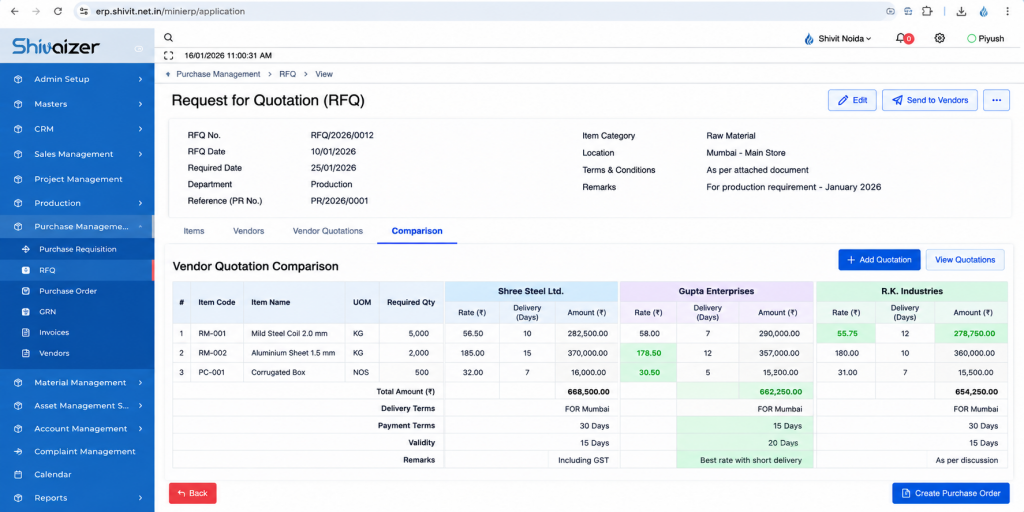
Its documented RFQ workflow supports generating an RFQ against a purchase requisition, assigning multiple vendors, collecting quotations through secure links, comparing approved quotations and generating vendor-wise purchase orders from the finalized comparison.
The documented GRN process records receipt against an approved PO, supports partial and complete delivery status, allows vendor bills to be uploaded at the GRN stage and updates inventory records after the GRN. Purchase, GRN, stock and item-ledger reports reflect the receipt.
For a wider comparison of tools, see 10 Best Purchase Order Software in India .
What Should You Do Next?
Frequently Asked Questions
What does purchase management software do?
It manages the purchasing cycle from requisition and approval through RFQ, quotation comparison, PO, GRN and invoice verification, and keeps the records linked.
When should a business move beyond Excel?
When approvals, quotations, POs and receipts are tracked in different files and you can no longer see open commitments or pending approvals without manual follow-up. See the seven signs above.
Can it automate purchase approvals?
Most systems can route requests to approvers. Check whether rules can vary by value, category and location, and whether decisions are logged.
Can it compare vendor quotations?
Systems with RFQ support can. Confirm that comparison covers delivery and terms, not just price, and that the PO can be created from the result.
Can it track purchase orders and connect PO with GRN?
It should show open, partly received and closed status, with the GRN created against the PO so balances update.
Can it support invoice verification?
This varies widely by product. Ask specifically how mismatches between PO, GRN and invoice are detected and handled.
Can it integrate with Tally or another ERP?
Often yes, but scope differs. Ask what data moves, in which direction, and who maintains the integration.
Can it manage multiple locations?
Ask for a demo of location-wise requisitions, receipts and reports.
How much does it cost in India?
It depends on users, modules, deployment, implementation, customization and integration. Request a written quote and compare total cost of ownership.
What should a manufacturer check before buying?
Partial receipts, GRN-to-inventory impact, multi-location purchasing, invoice verification, approval control and integration, tested with your own scenario.
Conclusion
The goal is not to buy the software with the most features. It is to build a purchasing process where requirements, approvals, vendors, orders, receipts and financial records stay connected as the business grows. Map your process, use the checklist, and let a live demo of your own scenario decide.